
Install KindDesk on your own server
One command on a Linux server, or the browser installer on shared hosting. Either way it takes a few minutes, and setup asks six questions.
Create a free account and start your 30-day trial.
Check the requirements below: PHP 8.3 and SQLite or MySQL.
Run the installer, connect your trial licence and sign in.
curl -fsSL https://get.kinddesk.io | bashChecks the server, verifies our signature, installs, then asks for your database, site address, company, first product, first administrator and timezone.
30 days free, card required, cancel any time. The card is not charged during the trial; the yearly plan starts automatically unless you cancel before it ends. Accounts privacy policy.
What your server needs
The release already carries its PHP dependencies and the built interface.
| Operating system | Linux. macOS works for a trial. Windows with IIS or Laragon through the PowerShell installer (see below). |
|---|---|
| PHP | 8.3 or newer, for the website and the command line |
| PHP extensions | pdo, curl, mbstring, json, openssl, dom, fileinfo, zip, iconv, bcmath, sodium, plus pdo_sqlite or pdo_mysql |
| Database | SQLite (one file, nothing to set up), or MySQL 8.0+ / MariaDB 10.6+. PostgreSQL is not supported. |
| Disk | 400 MB free to install; an update needs about 300 MB while it runs |
| Address | The root of a domain or subdomain, such as desk.example.com. Not a sub-folder. |
| Web server | nginx, Caddy or Apache, pointed at the public/ folder |
| Background | A cron entry every minute and a queue worker (systemd or Supervisor). Hosts that cannot keep a process running can let the scheduler work the queue. |
| Not needed | Composer, Node, git, or the PHP IMAP extension |
Install with one command
Run it on the server, as a user that can write to the folder you install into.
curl -fsSL https://get.kinddesk.io | bash- It checks the server: PHP and its extensions, disk space, write access, and that the release server can be reached. It lists every problem at once, with the command that fixes it, and changes nothing until they are fixed.
- It downloads the release, verifies its checksum and checks that we signed it. An archive that does not match is discarded.
- It unpacks the files and hands them to the account that runs PHP.
- It runs the setup, which asks for the database, the site address, your company, the first product, the first administrator and the timezone.
- It prints what is left: the web server's document root, the cron line, the queue worker and the command that checks the install.
Trying it on your own machine first? Add --serve and it starts a local server when setup is done:
curl -fsSL https://get.kinddesk.io | bash -s -- --serveOn Windows (IIS or Laragon)
Run this in PowerShell and follow its prompts:
irm https://get.kinddesk.io/install.ps1 | iexUnattended installs, shared-hosting layouts and every installer option are in the help center.
No terminal? Use the browser installer
On most shared hosting the whole setup runs in the browser. It asks the same questions and does the same work as the command line.
- Download the release archive (the help center links to it) and upload it with your host's file manager. Extract it above the web root.
- Point the site's document root at the
public/folder inside it. - Open your site. It shows One step left: set up this helpdesk. Choose Set up in the browser.
- Paste the install token from
storage/app/install-token. Only someone who can read the server's files has it, so nobody else can set up your desk first. - Follow the steps, press Install KindDesk, and copy the cron line it gives you into your control panel. Then connect your trial or paid licence when KindDesk asks for it.
Two background processes keep mail moving
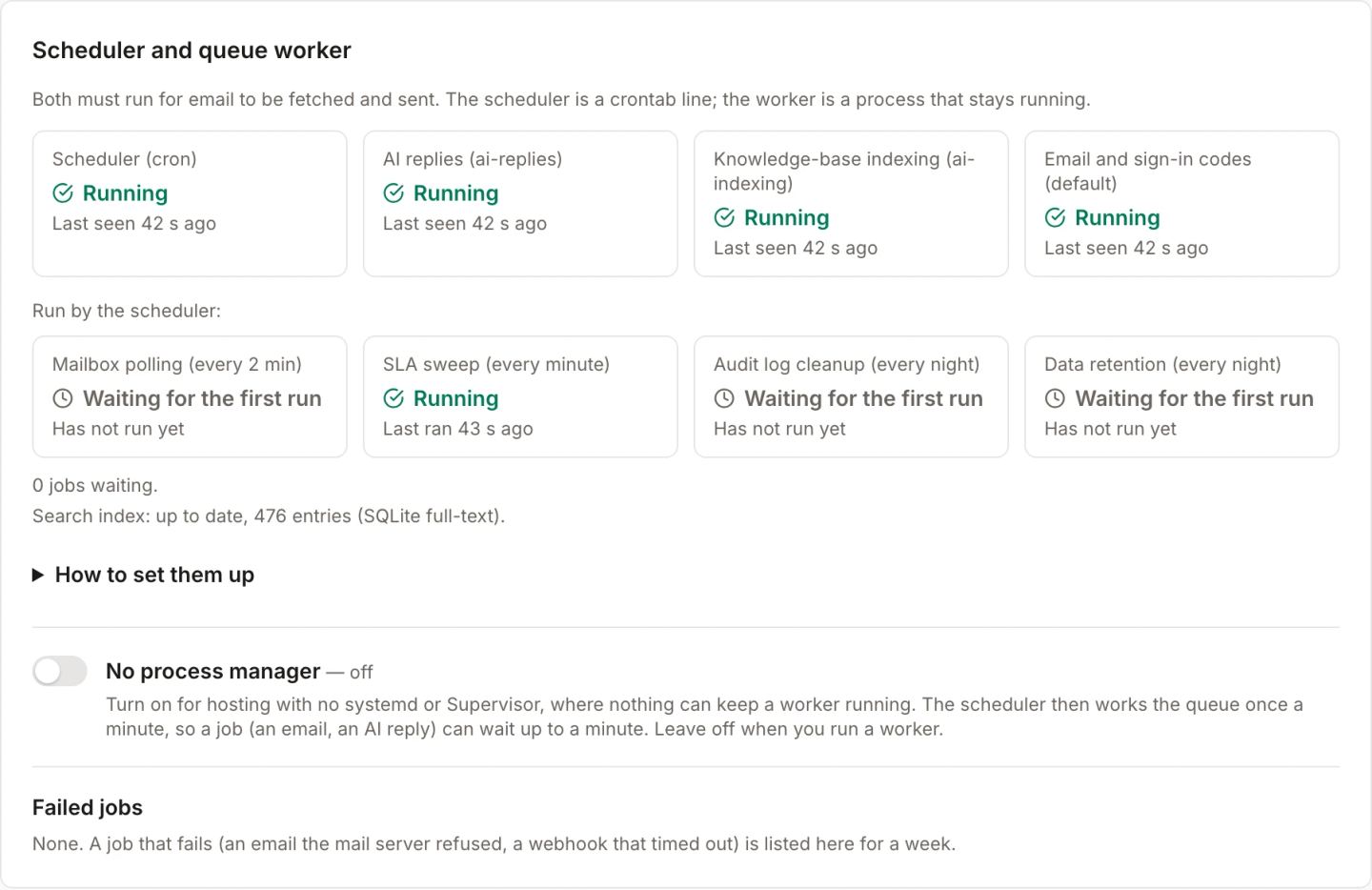
Without them no email is fetched or sent. The setup prints both with your paths filled in, and can install them for you with --with-cron and --with-systemd.
The scheduler
One line in the crontab of the user that owns the files:
* * * * * cd /var/www/kinddesk && /usr/bin/php artisan schedule:run >> /dev/null 2>&1The queue worker
A systemd or Supervisor service that runs php artisan queue:work. If your host cannot keep a process running, turn on No process manager in System status and the scheduler works the queue once a minute instead.
The app's System status screen, and php artisan kinddesk:doctor on the command line, check both, along with the database, permissions, email and security, and print the fix next to anything that fails.
Updates you can trust, and undo
Press Update now in System status, or run one command. An update needs an active licence.
- The download is checked against its checksum and our Ed25519 signature before anything changes. The public key is built into your install, so a tampered release server cannot ship code to you.
- The database is snapshotted first. If that fails, the update stops with your install unchanged.
- Visitors see a short maintenance page; the queue worker restarts on the new code.
- Your
.env, uploads, logs, backups and SQLite database are never touched. - A rollback puts the previous version's files back. The database stays as it is; the snapshot is there if you need it.
cd /var/www/kinddesk
php artisan kinddesk:update --check      # the running and the published version
php artisan kinddesk:update              # download, verify, back up, apply, migrate
php artisan kinddesk:update --rollback   # put the previous version's files back
Check a release yourself
Every release archive comes with a checksum and a signature file. This is the public key they are signed with.
mvtLpxLc3/EXFv/YlOFif3HzVnyYpwaG481OtfFNyOM=Key id 29d9e28e8b8cd3c7. The same key is pinned inside every release and in the installers. The manual verification steps are in the help center.

Your desk, on your server, today
Create a free account to start your 30-day trial, then install KindDesk with one command or the browser installer.
30 days free, card required, cancel any time. The card is not charged during the trial; the yearly plan starts automatically unless you cancel before it ends. Accounts privacy policy.