
Everything in KindDesk, in one plan
Every feature on this page is included for $99 a year, with unlimited agents. The pictures are built from the product’s own screens; the screenshot gallery at the end shows full screens as they ship.
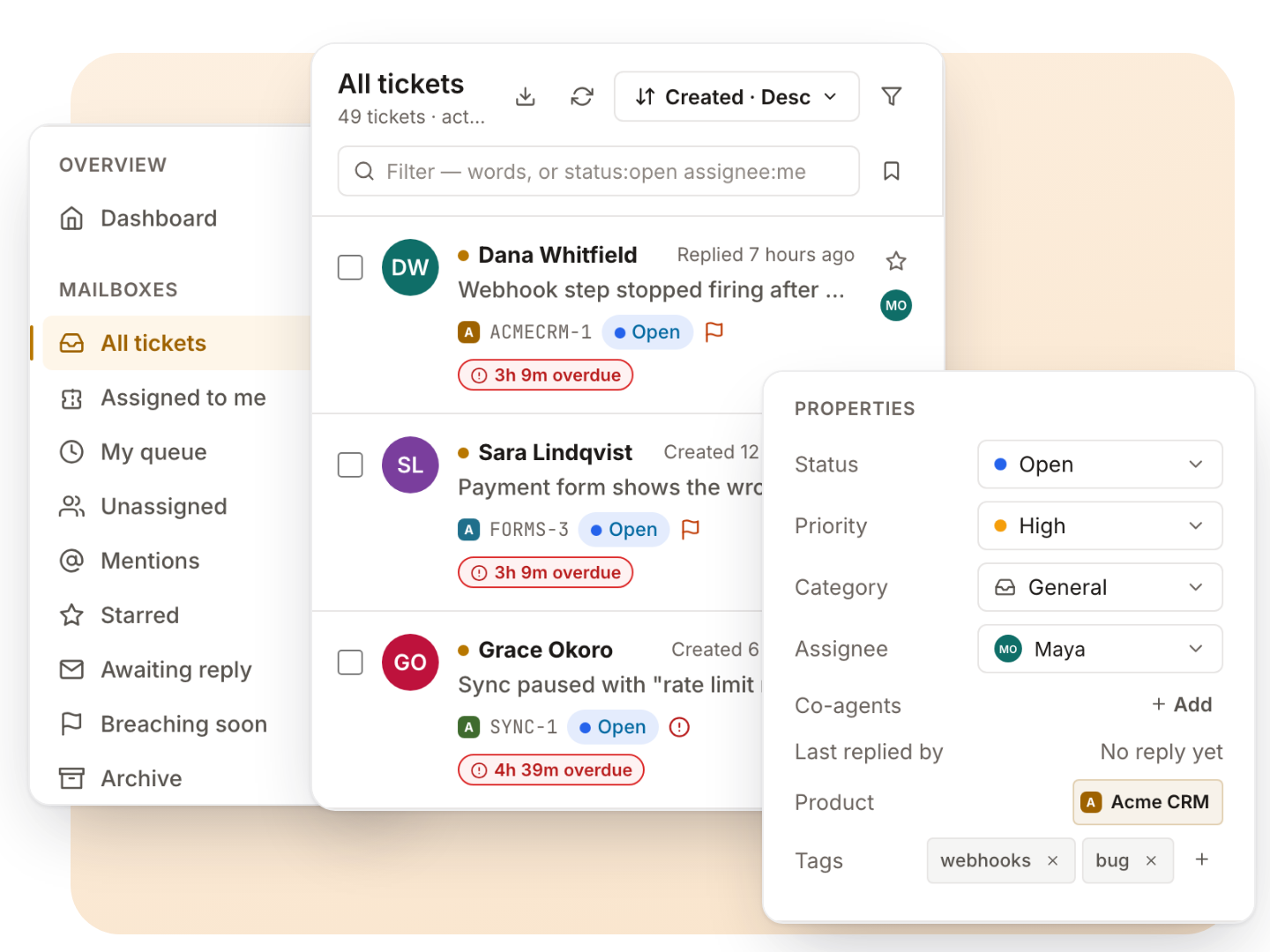
Every product’s tickets in one inbox
All your products’ tickets in one list, or one product at a time, with the views a team actually works from.
- Thirteen built-in views, from unassigned and mentions to awaiting reply and breaching soon, plus a view for every status
- Saved views, private or shared with the team, pinned or set as your default
- Filters for status, tag, assignee, SLA, custom field and organization, plus operators typed in the search box
- Bulk close, assign, tag, merge, mark as spam and delete
- See who else is looking at a ticket, right in the list
- Export the list as CSV
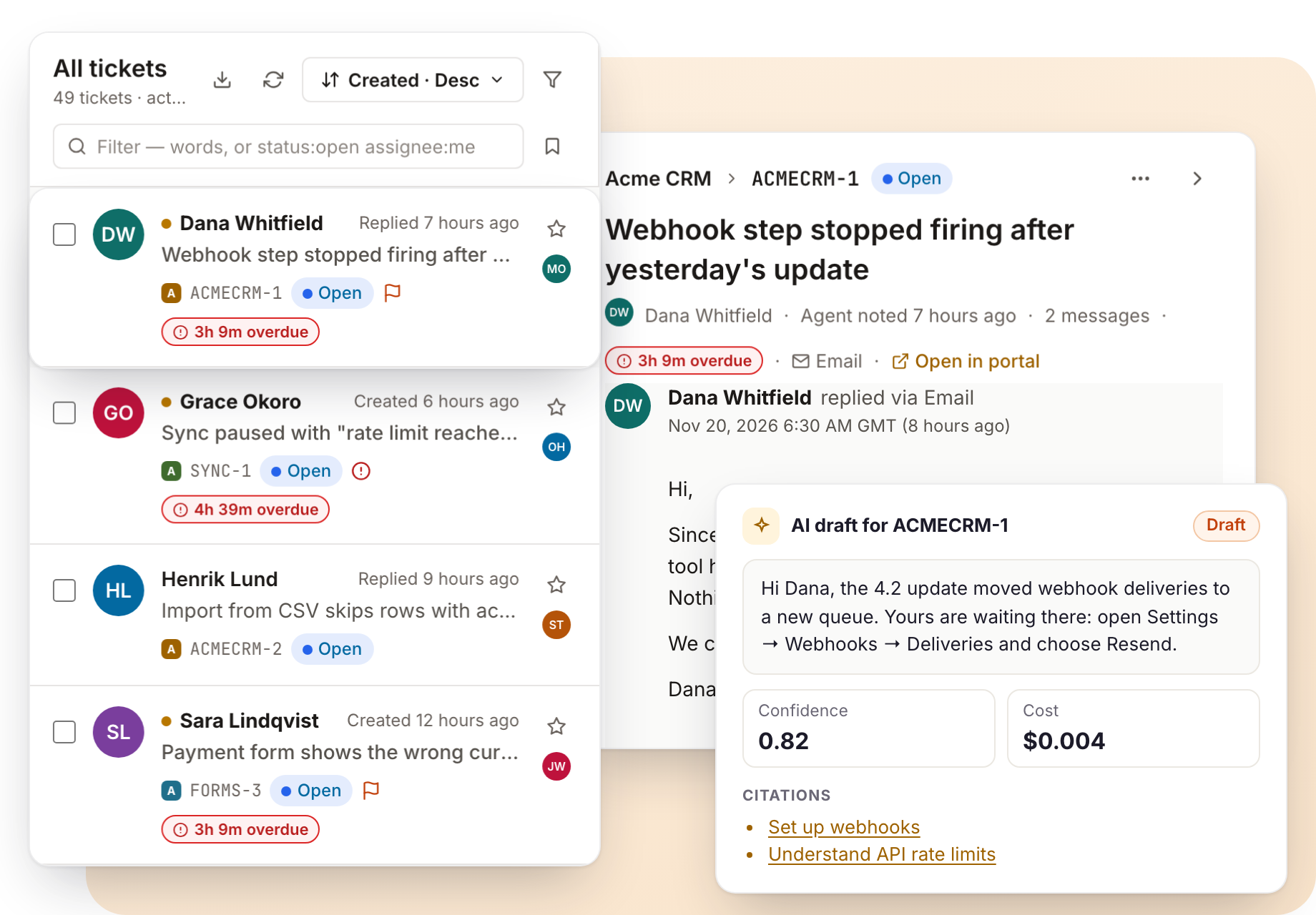
Everything about the customer, beside the conversation
The conversation in the middle, everything about the customer beside it, and a composer that saves typing.
- Customer, properties, custom fields, SLA, time, licence, Credentials Vault and linked tickets in the side rail
- Internal notes and @mentions; co-agents alongside the assignee
- Saved replies with variables, signatures and a knowledge-base article picker
- Undo window on every reply, send later, and send-and-set-status in one click
- A warning before you send if someone changed the ticket meanwhile
- Merge, split a message into its own ticket, link related tickets, change the requester
- Time tracking with a running timer, satisfaction ratings and a printable copy
- Open a GitHub issue from the ticket in the product’s repository
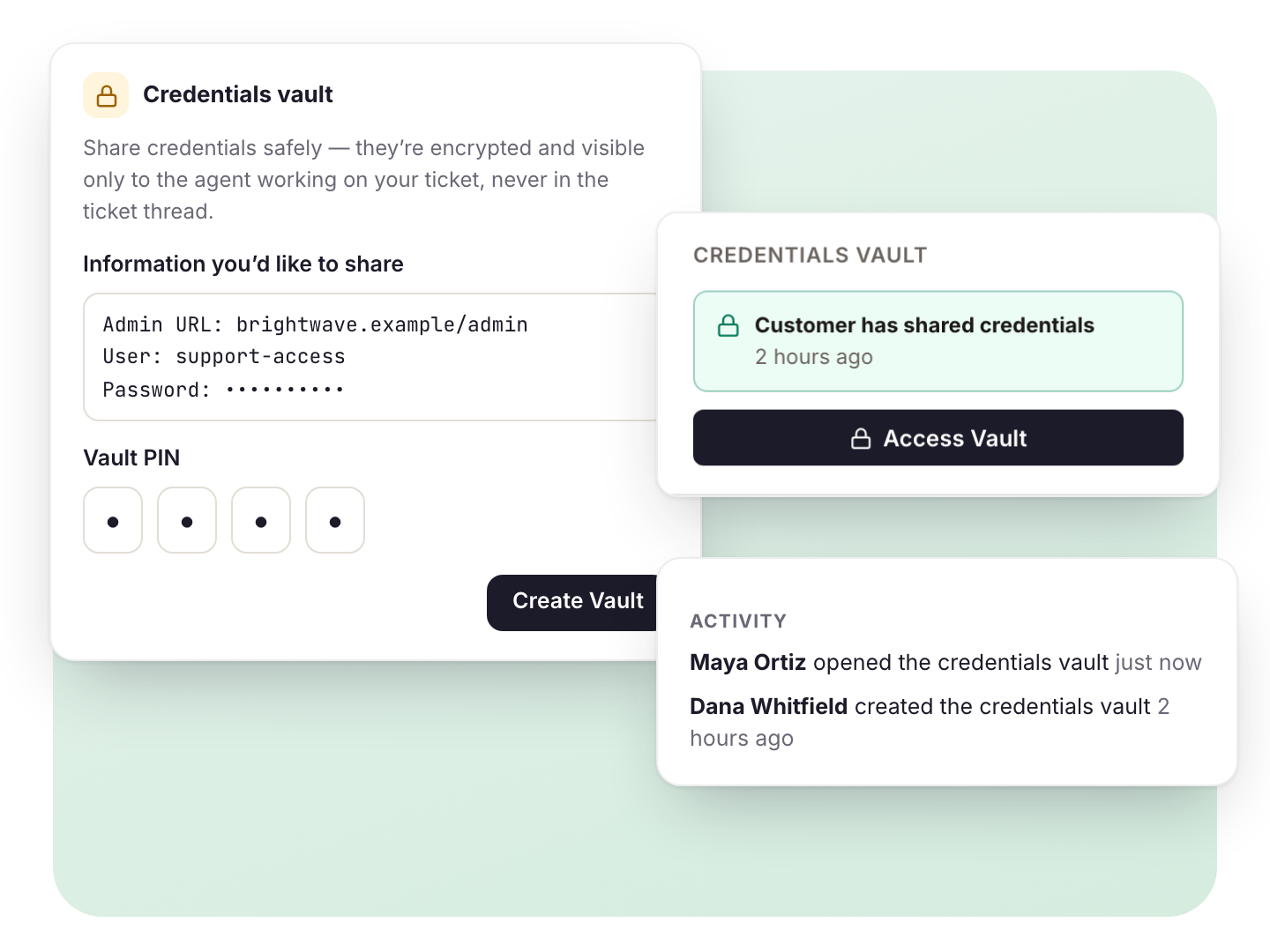
Credentials Vault: secrets never travel by email
When you need a customer’s login to investigate, they store it in a vault on their ticket instead of pasting it into a reply.
- The customer adds the details on their ticket in the portal and sets a 4-digit PIN to view them again later
- Stored encrypted twice: once for the agent, once under the customer’s PIN
- Only the agent assigned to the ticket can open it, and only if their role allows opening shared credentials. Not other agents, not even admins
- Every opening is recorded on the ticket’s activity and in the server log
- One click sends the customer a request with step-by-step instructions
- The customer can replace or delete it at any time; it is removed with the ticket or when the customer is anonymized
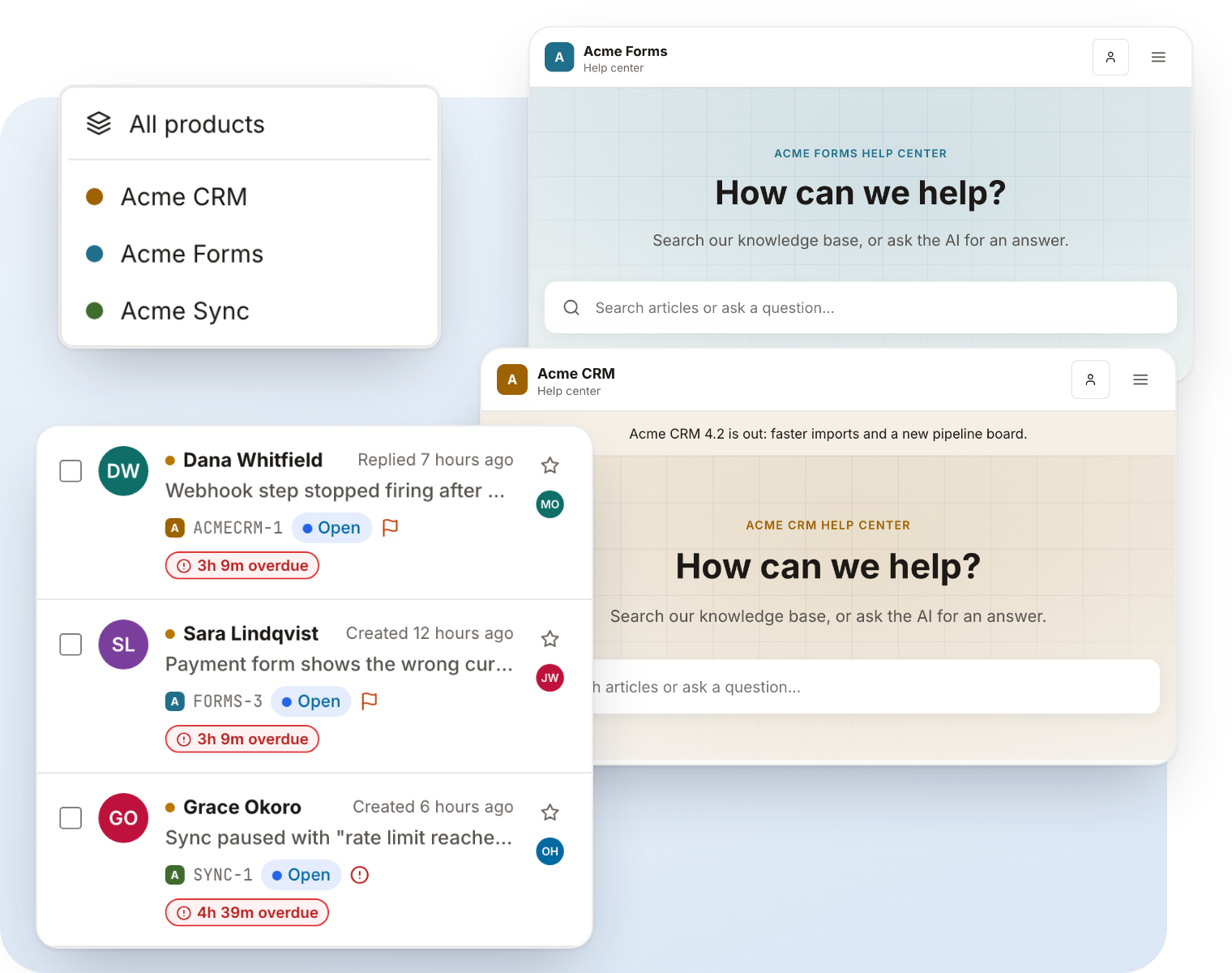
A complete support desk for each product
Run every product or brand from one install. Each gets its own support desk; your team works them all from one inbox. Early-bird licences keep unlimited products while they renew.
- Its own help center and knowledge base, on its own custom domain
- Its own mailboxes, ticket prefix and numbering
- Its own logo, colours, fonts, hero style, navigation, footer and custom CSS
- Its own help widget, SLA targets, saved replies, AI settings and customer sign-in
- Its own languages and announcement bar
- Agents can be limited to the products they work on
Connect every support address, whatever your mail host
Each mailbox belongs to a product. Mail becomes tickets with the thread intact, and replies go out from the same address.
Mailbox password (IMAP and SMTP), Google Workspace or Gmail sign-in, Microsoft 365 or Outlook.com sign-in
Inbound webhooks from Postmark, Mailgun, SendGrid and Amazon SES when your host blocks IMAP
No PHP IMAP extension needed: mail is read in plain PHP
Auto-replies, bulk mail, bounces and unknown senders are held for review instead of opening tickets
Mail that claims a known customer’s address but fails DMARC is held, not posted
Test incoming and outgoing mail, and check SPF, DKIM and DMARC for each address
CC, BCC and forwarding without losing the thread
Copy people in, forward to outside experts, and keep their answers with the ticket.
Real Cc headers so reply-all works; one private copy per BCC
Customers can add CCs from the portal; CCs in incoming mail can be added automatically or suggested
Forward a message to an outside address and keep the reply on the ticket as a side conversation the customer never sees
Unknown senders replying to a ticket can be accepted, held for review or refused, per product
Always-BCC an archive address, and choose how quoted history and signatures behave
Rules that route, tag and follow up for you
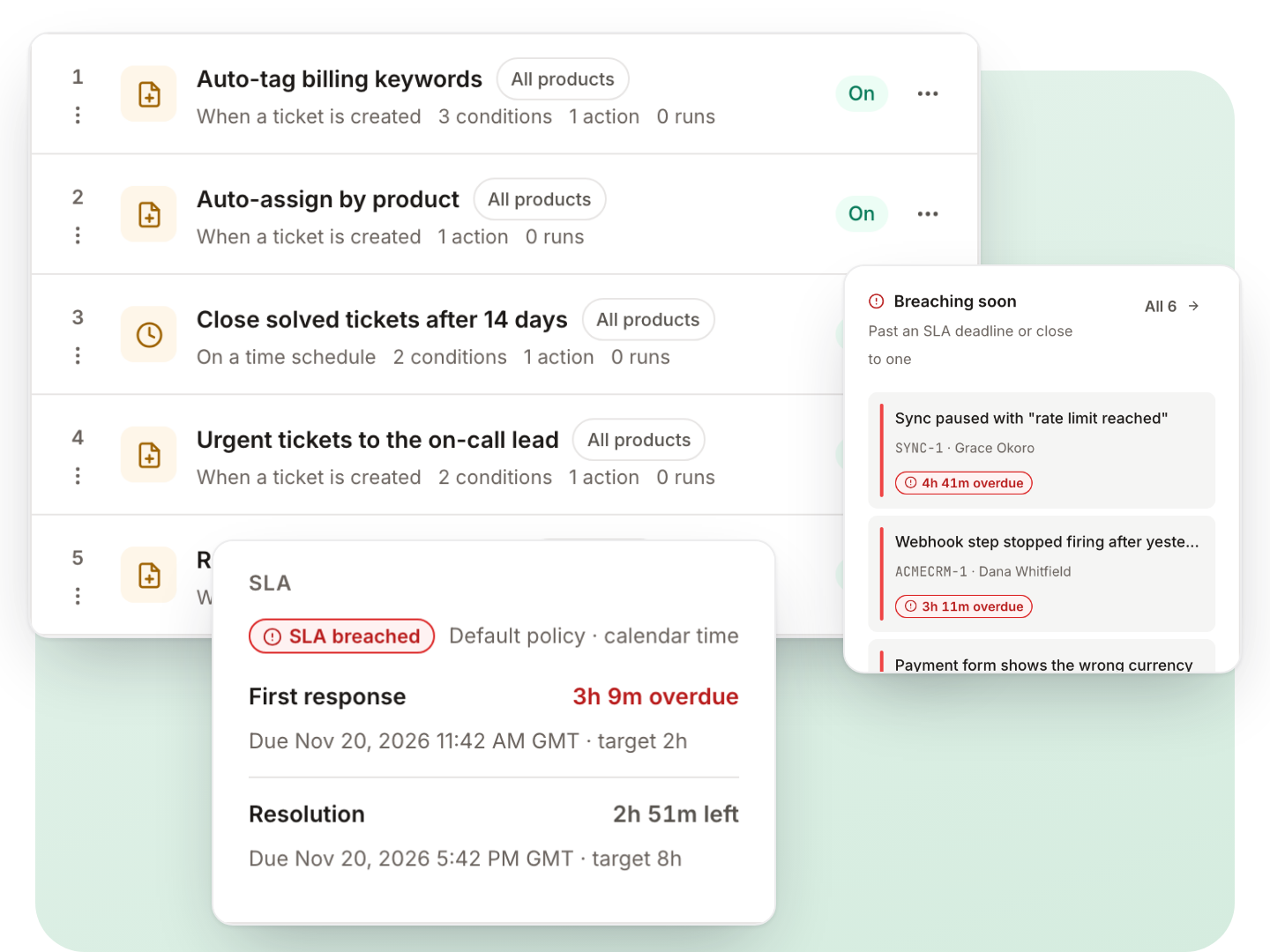
Rules react to new tickets, changes, incoming mail, ratings, SLA deadlines and the clock.
- Triggers: ticket created or updated, email received, rated, merged, customer created, SLA due soon or missed, and time-based rules every five minutes
- All and any condition groups over ticket, message, requester, licence, agent, business hours and custom fields
- About 25 actions: set fields and tags, assign by round robin or load, add a co-agent, send a template, post to a chat channel, call a webhook, open a follow-up ticket
- Test a rule against a real ticket before saving; run history, loop guard, starter templates, import and export
SLA targets that follow your working hours
First-response and resolution targets per product and priority, measured in your business hours.
- Work schedules with holidays; the clock pauses while you wait on the customer
- Organization-specific targets and per-ticket overrides
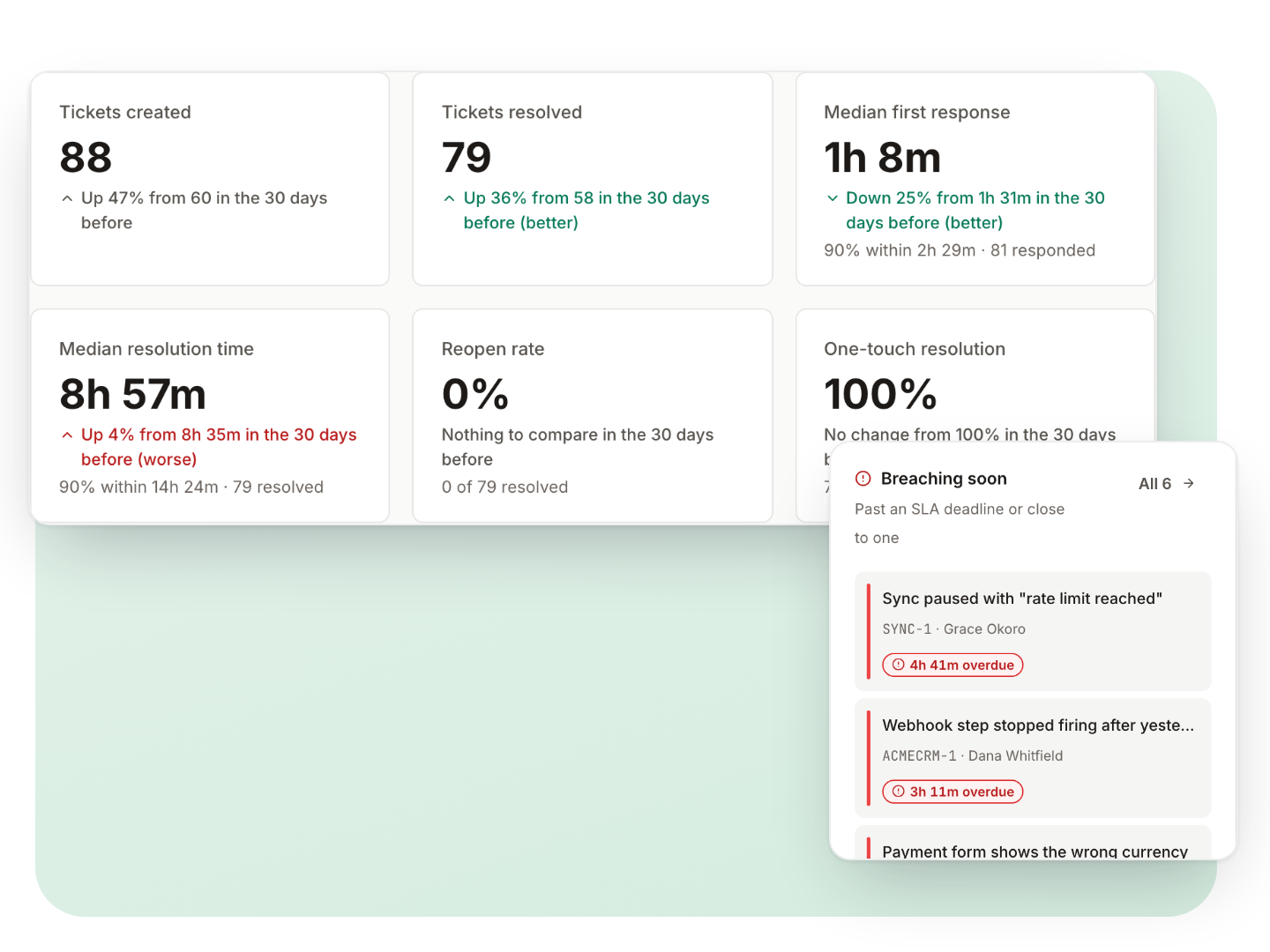
- A Breaching soon view, due-soon and missed triggers for automations, and SLA in reports
A help center and portal for each product
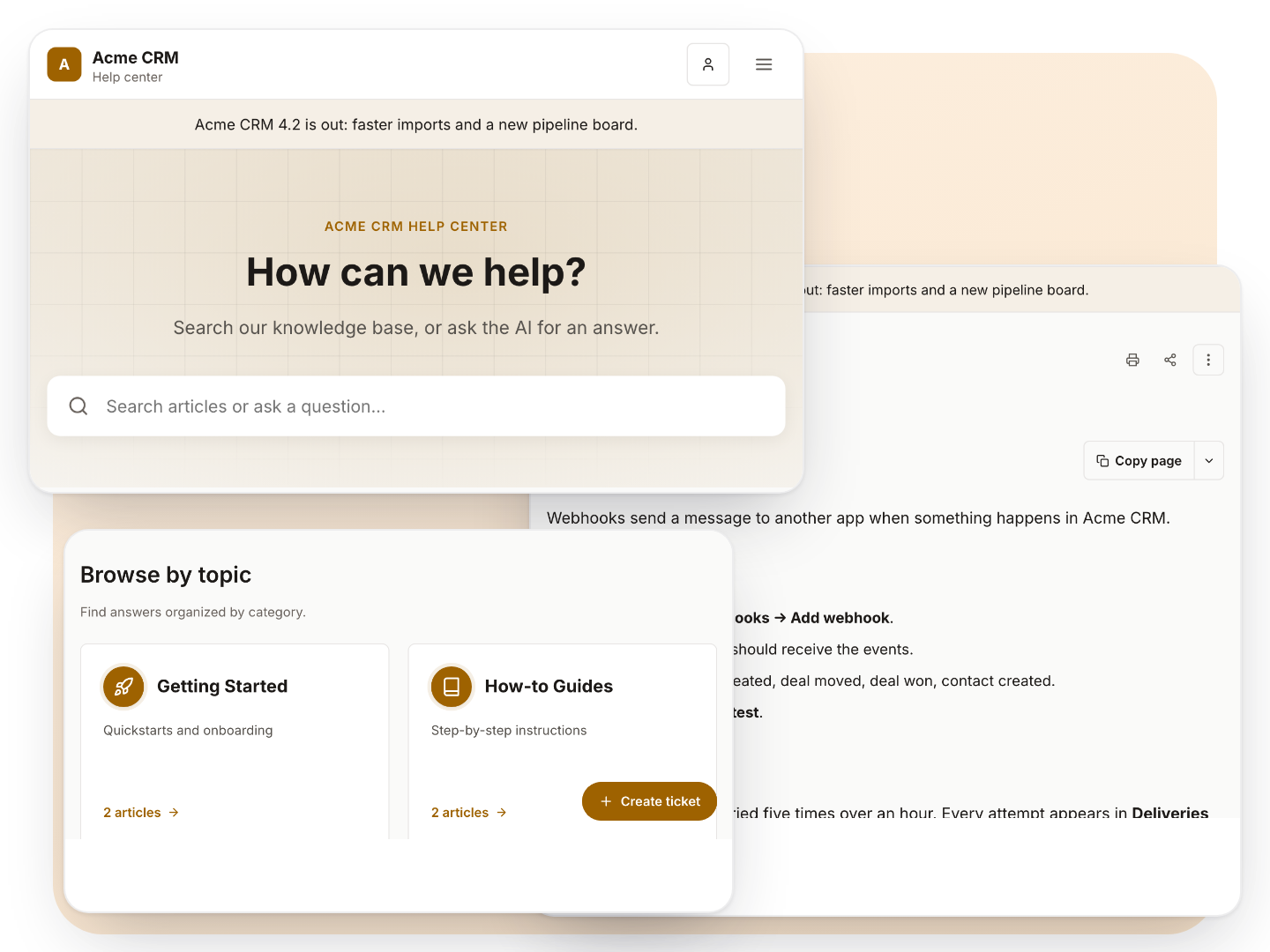
Customers search answers, open tickets and follow them, in a portal that looks like your product.
- Instant search that tolerates typos, with an AI answer and its sources when AI is on
- Articles with a table of contents, related articles, helpful votes and copy as Markdown
- Every article has a Markdown version; the help center publishes llms.txt and sitemaps
- Ticket form with custom fields, attachments, CC and bot protection; guests confirm by email
- My tickets, with organization sharing so a customer’s colleagues can follow the same tickets
- Customer sign-in through your own product accounts (OpenID Connect) per product
- Installable as an app on phones; readable brand colours are worked out for you
Write articles once and keep them current
Write, schedule and keep articles current, with history you can go back to.
Markdown editor with preview, autosave and image upload
Versions you can compare and restore
Scheduled publish and unpublish, review-by dates, summaries and SEO fields
Categories per product; view counts and helpful votes per article
Answers on your own website, from the help widget
One script tag adds a help button to your site. Visitors search, read, ask the AI and send a message without leaving the page.
- Shown only on the sites you list; no cookies and nothing stored on your page
- The contact form runs through the same spam and rate limits as the portal
- A JavaScript API to open it from your own button, identify a signed-in visitor or follow your site’s theme
- Works on sites with a strict Content Security Policy
AI grounded in your docs, with your own provider
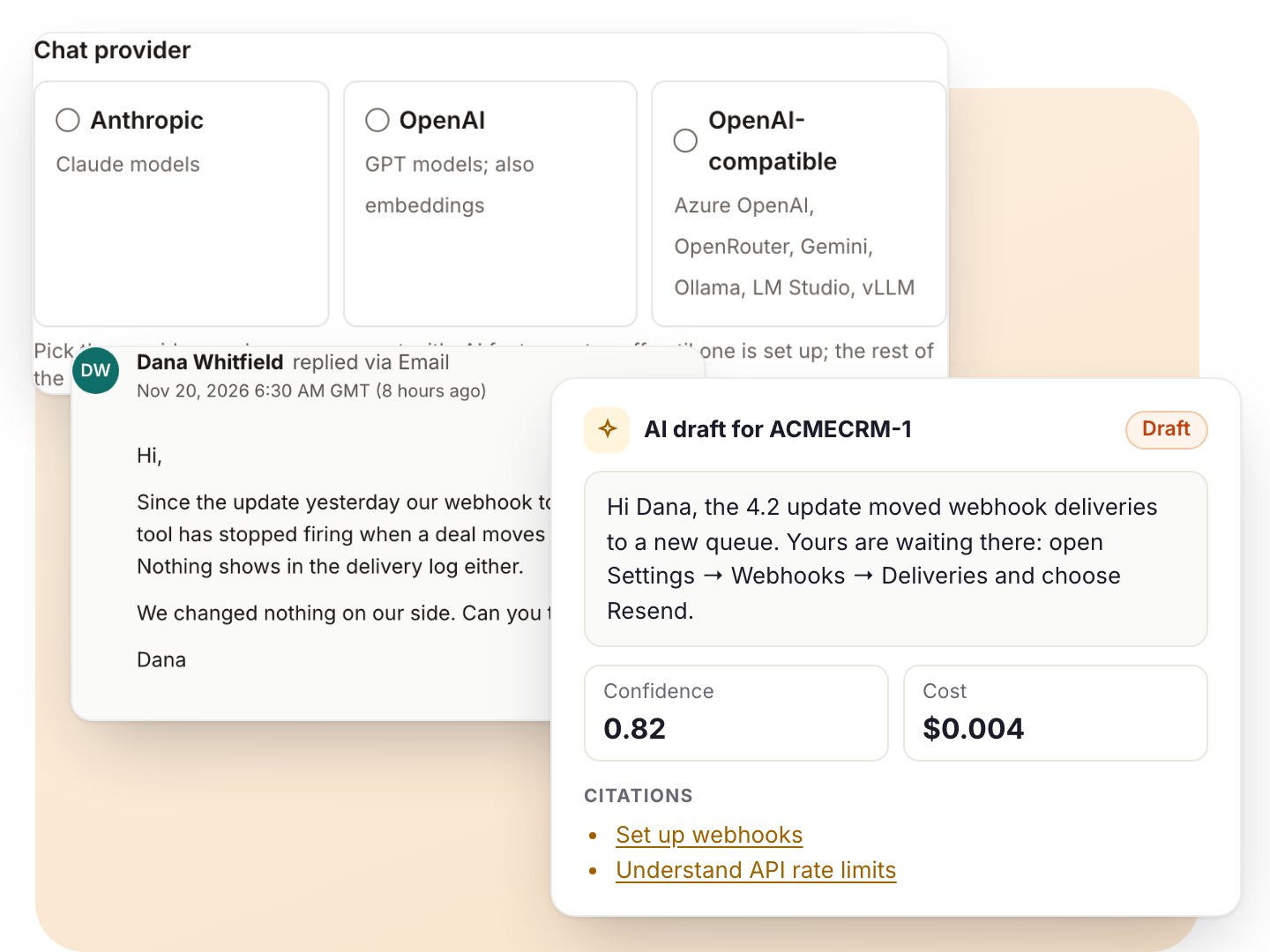
Use Anthropic, OpenAI or any OpenAI-compatible service, including Azure OpenAI, OpenRouter, Google Gemini or a model on your own machine. You pay your provider directly; KindDesk adds nothing to the bill. AI stays off until you add a key.
- Reply drafts with citations from your knowledge base, external docs and, if you want, your code repositories
- Draft-only by default; automatic replies only above the confidence you set, and a hand-off to a person below it
- A reply that would quote indexed code or internal notes is held as a draft
- Internal AI knowledge per product that the AI uses and customers never see
- AI answers in the help center and the widget, with sources
- Department routing and spam screening of new tickets
- A monthly budget, a price table per model and a log of every AI reply
Work the desk from your AI assistant
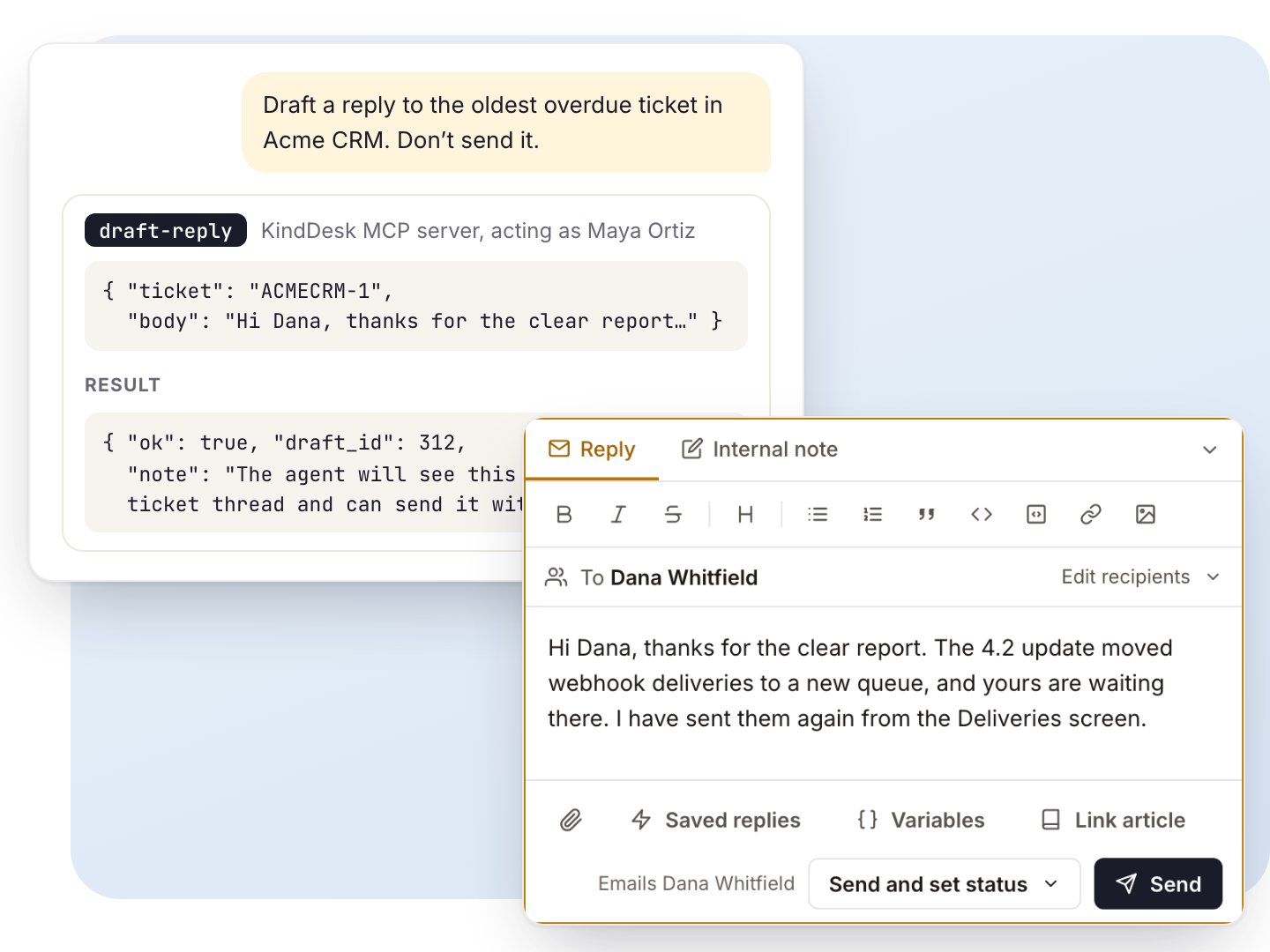
KindDesk includes an MCP server with 19 tools. Any assistant that supports MCP can search tickets, read a thread, draft a reply, update a ticket or manage articles, as you and with your permissions.
- Connect with a personal key or by signing in (OAuth); revoke a connected app from your profile
- The assistant can do only what your role allows, on the products you can see
- Drafts stay drafts until a person sends them
- Tools for the inbox summary, ticket search and history, customers, saved replies, and creating, updating and publishing articles
Works with Claude (claude.ai, Desktop and Code), ChatGPT, Cursor, Gemini CLI, VS Code with GitHub Copilot, Windsurf, Grok (Grok Build CLI), and any other assistant that supports MCP.
Extra for software sellers: customers’ licences beside each ticket
If your business sells software licences, agents see each customer’s plan, expiry and activated sites beside the ticket.
Sync licences from WooCommerce, FluentCart or your own endpoint, on a schedule
Licence plan and status as conditions in automations
Licence expiry reminders to customers, with a renew link
A purchase webhook creates the verified customer at checkout
Reports that answer the questions you get asked
Created against resolved, response and resolution times, backlog by age, SLA, satisfaction and logged time.
- By product, channel, priority, agent, organization or tag; compare with the period before
- Open the tickets behind any figure; download any table as CSV
- Email reports on a schedule
- Satisfaction surveys with faces, stars or an NPS scale
Every customer and company in one place
Everyone who wrote in, with their tickets, licences and company.
Search runs on the server, so long contact lists stay fast; edit, merge, block, verify or delete
Organizations with email domains, managers, default priority, SLA targets and notes
Custom fields on contacts and organizations; CSV export
Exactly the access each person needs
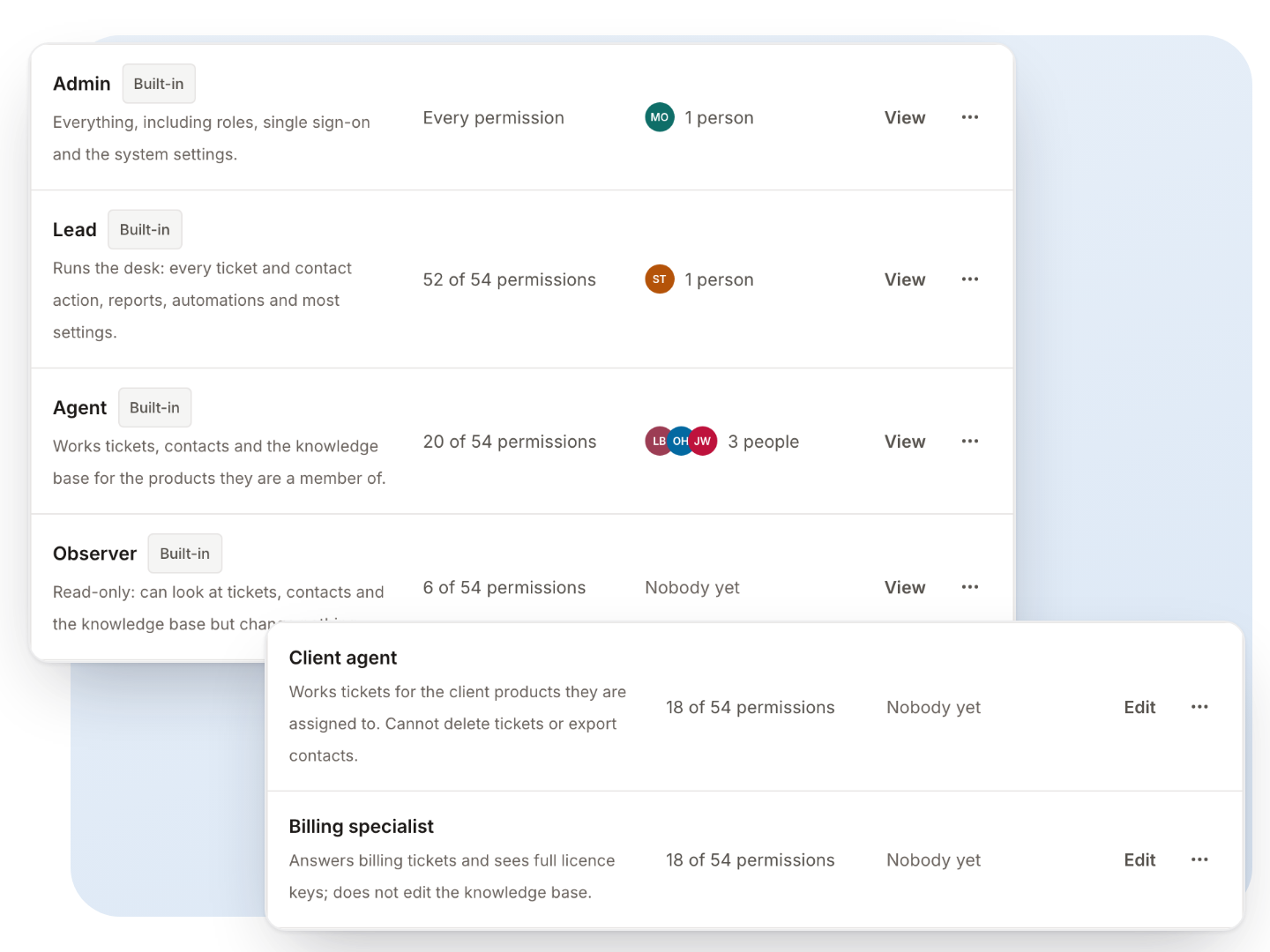
Admin, lead, agent and observer are built in. Make your own roles from 54 permissions, and limit anyone to selected products.
- For someone limited to some products, everything from the others disappears: tickets, contacts, reports, the API and the MCP server
- An agency can run one desk for several clients and give each client’s team only their product
- Nobody can hand out more access than they hold; the last admin always stays an admin
- SAML single sign-on for agents, with a default role for new people
Security and privacy tools, built in
Two-factor sign-in you can require per role, an audit log of who did what, and the tools data-protection requests need.
Two-factor sign-in with an authenticator app or emailed code, recovery codes, password rules and idle sign-out
An audit log of sign-ins, settings, access changes, exports, updates and vault openings, with CSV export
Export one person’s data, anonymize them, place a legal hold, or set retention to delete old tickets
Private attachments, encrypted secrets, signed webhooks and protection against requests to your internal network
Your help center in your customers’ languages
Add the languages your customers read; the help center, the widget and customer emails follow each customer’s language, right-to-left scripts included.
Edit, import and export every string, or draft missing ones with AI
KindDesk ships in English: you supply or draft the other languages. The agent app is in English
A REST API with scoped keys, an OpenAPI reference and idempotent writes
Signed webhooks for 22 ticket, customer, article and organization events, with a delivery log and resend
Notifications to Slack, Microsoft Teams, Discord and Google Chat, plus browser push for agents
A command palette and keyboard shortcuts for the whole agent app
Built to be run by a small team
The tools that keep a self-hosted desk healthy are part of the product.
A doctor command and a System status screen that check the server, database, scheduler, queue, mail and security
Backups in the app or from the command line, daily backups and restore
Signed updates with a database snapshot first, and rollback
SQLite or MySQL; a browser installer for shared hosting
On our roadmap
What we are building next, and what KindDesk does today in its place. If one of these decides it for you, tell us: it shapes the order we build them in.
- Upcoming
Live chat in the widget
Real-time conversations from the help widget.
Today the widget searches, answers with AI and takes messages.
- Upcoming
One-click macros
Reply and set status, tags and assignee in one step.
Today saved replies insert the text, with variables.
- Upcoming
Import from your current helpdesk
A built-in importer for Zendesk, Freshdesk and Help Scout.
Today the REST API can create customers, tickets, replies and articles, so a script can bring your data across.
- Upcoming
Field-by-field ticket history
Every change to a ticket, in its own timeline.
Today the audit log records actions across the desk.
- Upcoming
Native mobile apps
Agent apps for iOS and Android.
Today the agent app works on phones and installs as a web app with push notifications.
- Upcoming
Phone, SMS and social channels
More ways for customers to reach you.
Today tickets come from email, the help center, the widget and the API.
The real product, screen by screen
Screenshots from a KindDesk install with made-up customers. Select one to see it full size. Questions about a screen? Help center.

Try every feature free for 30 days
Create a free account to start your 30-day trial, then install KindDesk with one command or the browser installer.
30 days free, card required, cancel any time. The card is not charged during the trial; the yearly plan starts automatically unless you cancel before it ends. Accounts privacy policy.